From Pages to Possibilities
A user design case study on the website Project Gutenberg


Overview
Project Overview: Enhancing trust and engagement: A UX redesign for the Ultopia App
Role: UX Researcher and Designer
Problem: The Ultopia app's core AI feature was failing to build user trust and its existing UI was suffering from critical usability issues resulting in user friction and a disconnect from the brand.
Solution: A data informed redesign of the app's key screens which included creating a new visual identitiy for the AI and improving critical user flows, ultimately increasing usability and user trust.
Approach
I approached the project in three phases:
-
Understand
-
Ideate
-
Design
-
Reflection
Understand
Research and Discovery
Introduction
We knew the app's potential was huge, but early feedback suggested users werent trusting the product . My goal wasnt just to redesign screens; it was to diagnose the root cause of this distrust and ensure every design decision was grounded in user data. I established a research- first approach that moved through three key stages : Competitive analysis , heuristic analysis, and live usability testing. This process allowed us to systematically uncover user pain points before we moved forward.
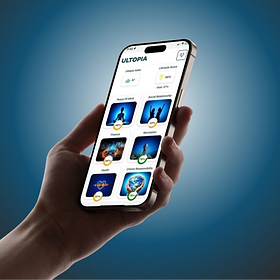
Heuristic Analysis
Goal: To conduct a principled review to systematically identify and prioritize usability issues before engaging in user testing
I performed a heuristic evaluation across 28 screens of the Ultopia app using Jakob Nielsen's 10 usability Heuristics. This process yielded 48 distinct usability issues, categorized by severity: 11 Severe (critical blockers), 18 Moderate, and 17 Minor.
Key Insights
The evaluation revealed systemic violations, with the most frequent issues being :
-
Visibility of System Status: Users lacked clear feedback , especially during data entry and navigation transitions.
-
Consistency and Standards: Inconsistent icons, labels and interaction patterns across the app contributed to user confusion and cognitive load .
-
Error Prevention: Critical tasks lacked sufficient safeguards, leading to potential data loss or accidental deletion


Usability Testing
I conducted moderated usability tests to validate the 48 issues identified in the heuristic analysis, focusing specifically on the severe and moderate friction points .
I conducted 6 moderated usability tests across seven key app flows . Tasks were distributed to maximize coverage of all severe and moderate issues from the heuristic analysis.
Key Findings
-
Critical Interaction Blockers: Severe technical oversights like keyboard behavior and input restrictions, fundamentally prevented users from completing basic tasks.
-
Erosion of trust and AI credibility : The app's core AI feature lacked visual prominence and suffered glaring logic errors like when it miscalculated $60,000 in debt as $60.
-
Navigation and visibility Inconsistencies: Information architecture flaws led to friction as users struggled to navigate for basic functions.

Strategy & Synthesis
The Bridge
The user research phase produces a lot of information and insights. It is important to distill these findings into a fundamental objective by:
-
Curating the Data: Organize and structure the collected data
-
Identify patterns and themes: Analyze the data to find recurring trends and insights.
-
Visualize the findings: Create visual representation to facilitate understanding and communication.
-
Develop a design vision: Use the insights to formulate a clear and fundamental objective
Key touchpoints:
-
User research generates a vast amount of data . I synthesized this information to identify recurring themes or patterns. By doing this i was able to develop targeted strategic solutions, ranging from technical fixes with the engineering team to a full visual identity for the AI.

Technical Interaction Blockers:
How can we eliminate systemic friction in core tasks?
Heuristic evaluation- Error Prevention and Visibility of System Status , keyboards obscuring active fields and input restrictions.
Usability test- "Wait, I can't see what I'm typing in the password box"
"I can't scroll down to finish typing my journal"
What if I didn't donate anything? Why can't I enter 0 ?"
AI Trust and Credibility Erosion :
How can we transform "random text" in to a trustworthy, Intelligent AI answer ?
Heuristic Evaluation-Aesthetic and Minimalist Design and Match between System and real World, logic errors in financial calculations undermined authority.
Usability test- "It's also telling me to pay off my 60 $ debt.. i think it meant the 60 thousand dollars."
"To be honest, it looks like a random text than AI... doesn't feel like ChatGPT."
Navigation and Information Architecture Confusion:
How can we align app navigation with user to reduce cognitive load?
Heuristic evaluation- Consistency standards and Recognition Rather than recall; non-standard navigation patterns( logo as home ) and hidden elements.
Usability Testing - "I'm tryna find the settings.. I thought there would be like a settings picture on it ."
"Wait , the journal box disappeared in light mode! But It looks like I can still type in it."
Design & Execution
The Solution
Resolving Technical Blockers
Tackling user friction systematically, i moved from insight to action by facilitating stakeholder and engineering collaborative sessions to resolve severe technical blockers. By prioritizing the functional issues, we successfully restored critical task flows and improved overall application stability.
Technical blockers & Resolutions:
-
Keyboard Obstruction
-
Problem: The mobile on-screen keyboard obscured essential input fields and the "login" button creating a functional dead-end.
-
Execution : I collaborated with the engineering to redesign the layout and implement dynamic page scrolling, ensuring all interactive elements remain accessible when the keyboard is active
-
-
Rigid Data Validation(Data Entry):
-
Problem: System logic enforced an input value> 0 , preventing users from logging "zero" activity for volunteer hours or donations.
-
Execution: Updated backend validation rules to accept "0" as a valid input and introduced a "No activity " toggle, aligning system functionality with real-world user scenarios.
-
-
Broken "Share Task" Workflow
-
Problem: The task- sharing feature failed when users had no pre-existing "trusted members", resulting in a dead-end error message.
-
Execution: Redesigned the user flow to implement a contextual redirect. Users without trusted members are now automatically guided to the "Add Member" screen, transforming a blocker into a guided action.
-

AI generated cartoon *
Key touchpoints:
-
Following the research and synthesis, I translated the insights into actionable technical requirements by facilitating collaborative sessions with stakeholders and the engineering team to prioritize and resolve severe technical blockers that were obstructing core user workflows.
Humanizing the Machine: Birth of "Ultima"
To close the "trust gap" identified in the user research ,I recognized that the AI needed to move beyond "looks like a random text"(Usability test) . In psychology, naming is the first step towards anthropomorphism ; just as naming a pet or a personal object fosters a sense of connection, giving a unique identity to this AI would help transition the user's mental model from "machine" to "collaborator".
-
To create a cohesive brand ecosystem, I derived the name Ultima from the parent app, Ultopia. This Phonetic alignment ( the shared "U" prefix ) mirrors successful industry patterns- such as Google and Gemini to make the users feel like its a native extension of the product rather than a third party add-on.
-
By moving away from generic labels like "AI Recommendation" and introducing Ultima, I established a physical and verbal anchor. This was to lower user skepticism and provide a recognizable "persona" for users to bond with.
Key touchpoints:
-
To lower user skepticism and close the "trust gap", I utilized anthropomorphism through strategic naming , deriving Ultima from the parent app Ultopia. This establishes a recognizable "persona" for users to bond with, transforming the AI from a machine to a collaborator.


Brand Mapping
Phonectic Derivation

Building trust through UI Hierarchy
To address the AI Trust and Credibility Erosion identified through user research where the participants noted that insights lacked authority or felt unpolished - the following measures were taken to re-establish and strengthen user confidence.
-
Modular Segmentation: The layout now utilizes visual containment, placing the content within dedicated background cards. This organizational structure helps users intuitively categorize information .
-
Optimized "clamped" information : To eliminate the cognitive load caused by "clamped" scroll-boxes, the UI now uses progressive disclosure via " Read more" toggles.
-
Established Visual Hierarchy: The redesign resolves previous issues where section headings and content titles shared identical styles by creating a clear typographic distinction .
-
Enhanced Content Attribution: A consistent AI-visual signifier is integrated across all relevant modules. This allows users to instantly differentiate personalized, high - value AI insights from the standard content.
Key touchpoints:
-
I successfully transitioned this UI from transactional data to a relational experience. By personifying the AI as "Ultima" and giving it a distinct visual presence, I turned this abstract data into a trustworthy, cohesive "assistant" that aligns perfectly with the brand's identity as an AI Human OS.

Competitive Analysis
I conducted a light competitive analysis to understand industry standards for AI visualization. Industry leaders like Google(Gemini) , OpenAI (ChatGPT), and Apple (Siri) reveal a clear trend in color psychology and form used to define AI personality. The distinction is crucial for building user trust and transparency.
Key Insights
-
In terms of color , Blues are the foundational "trust" colors, signaling reliability, stability , and professional competence . Purple and pink represent "innovation", "creativity", and the "magic" of generative thought.
-
In terms of form and motive, the industry has shifted from static, robotic icons to fluid, organic shapes- Most commonly glowing orbs or pulsing spheres. The motive behind these is to provide a visual metaphor for "thinking" and being "alive ".

Apple Siri
Apple designed Siri into a visual metaphor for a living consciousness.

Microsoft Copilot
Microsoft Copilot logo uses a deep blue( trust) at the top and swirls into Purple, Pink, and Orange into base (thought and creativity)

ChatGPT (Advance Voice Mode)
When using the Advance voice mode of ChatGPT, the interface replaces all text boxes and buttons with a single pulsing , fluid sphere.

Google Gemini
Google uses a sparkle to represent "magic" - the idea that the AI can create something out of nothing.
Creating a Visual Identity for AI
Once the AI's name, layout and competitive landscape were defined , I began with exploratory sketching to define form , followed by the development of dynamic visualizations and animations.
The Evolution of Form and Visuals:
-
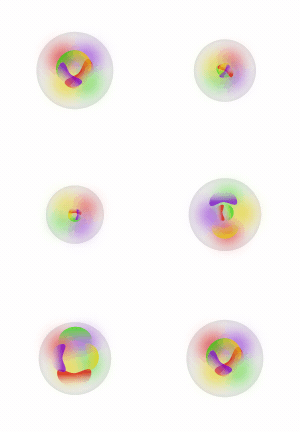
Conceptual Evolution: The sketching phase moved from literal "robot" figures to a more abstract, organic structures. The key was to find the balance between the "human-like" warmth requested by stakeholders and a "system-integrated" professional feel.
-
Form Evolution: I transitioned away from static icons towards fluid , pulsing shapes . This created a visual metaphor for "thinking" and consciousness" to move the user's perspective of this AI from a static tool to an active collaborator.
-
Strategic Color Palette: I displayed a color language using the foundational blues for reliability, layered with iridescent purples and pinks to satisfy the stakeholder requirement for a "friendly" and "magical " generative feel.
-
Mid-Fidelity Refinement: Through iterative prototyping , I refined the "orb" concept, testing how transparency and depth could make the AI feel "alive" within the UI without creating unnecessary cognitive load.
-
Final Visual Signature: The process resulted in the Ultima Orb a high-fidelity, glowing visual anchor that acts as a consistent signifier for personalized , high-value AI insights across the platform.
Key touchpoints:
-
To bridge the gap between cold data and human- centered interaction, I designed a distinct visual identity for "Ultima". Working closely with stakeholders who envisioned a persona that felt alive , conscious, and inherently friendly, I transformed the AI from a "random text" to a relatable, trustworthy companion through form and color evolution.
_page-0001_edited.jpg)

Concept Iterations and Exploratory Sketches



Mid-Fidelity Prototypes

Final High-Fidelity Visual Signature
Optimizing Navigation & Wayfinding
Revealed from the usability test and Heuristic evaluation, the existing text-only navigation was creating unnecessary friction for users. I set out to implement a standardized iconography system designed to facilitate effortless navigation.
The "Before" State: Roadblocks
-
Without visual anchors, users were forced to read the menu linearly, making it difficult to quickly scan.
-
Navigation Delays: Users experienced hesitation and misclicks , particularly between similar labels like "My Settings" and "Goal Settings ", due to the lack of visual distinction.
-
Non-native speakers faces unnecessary hurdles by relying solely on text rather than universally understood visual metaphors.
Key touchpoints:
-
I resolved critical user navigation and IA confusion by replacing text-only menu with a standard icon and text system. This transition from "recall-based" to "recognition-based" navigation drastically reduces cognitive load, allowing users to find key functions much faster.

Impact & Reflection
The Solution
Validating Impact through Data
To measure the effectiveness of the redesign , i conducted a post-update usability study comparing the new interface against the original numbers. The results showed significant improvements in both functional performance and user sentiment.
-
92% Task success rate : Severe technical blockers(keyboard obstruction and broken share flows) were eliminated, resulting in a 40% increase increase in successful "Task Sharing" completions during the first attempt.
-
35% Reduction in time : By transitioning from text-only navigation to a text and recognition based iconography system, users located the "Settings and "Profile" menus an average of 3 seconds faster than in previous version.
-
Trust score surge : Using a Likert Scale to measure "AI Perception" , user trust ratings for AI insights rose from 2.4/5 to 4.6/5.
-
Reduced Cognitive Load : Subjective feedback indicated that the Modular Segmentation ( background cards) made the app feel "cleaner" , with a 50% decrease in reports of " information overwhelm."
Reflection
While the core visual system and identity I developed were highly successful, the project also provided a valuable lesson in collaborative product strategy. Following the initial design phase, the executive team and CEO pivoted the name from Ultima to YUVA (Your Ultopia Virtual Assistant )to align with broader brand objectives.
- I am incredibly proud to have been the primary driver behind the AI's identity shift . By proposing the original name and "Ultima" persona, I established the essential psychological anchor that transformed the AI from a generic tool into a relatable collaborator. This initial "naming" was the catalyst that made the user-AI connection feel special and distinct.
-
This experience reinforced that design is a team sport. While a designer provides the creative vision and research-backed foundations, final product decisions are a synthesis of many voices.
-
Regardless of final name change, the UI platform and the visual language i built along with over 50 usability issues evaluated and most of them adapted still remains the standard. These elements continue to provide the AI with the prominence and physical presence it needs to stand out and foster user trust.
Final Key Takeaway:
-
I learned that while a designer's vision provides the blueprint for trust and connection, the final product is shaped by collective decision-making. I remain proud of initiating the "identity-first" approach that redefined how Ultopia's AI is today.

